Patreon Early Access

MF Nameplates

Every MF mod. One addon. Nothing to import.

One addon for both clients. Pick your game and we'll show you what MF Nameplates does there.

Browse community profiles

You can switch any time.

Patreon Early Access

MF Nameplates

Every MF mod. One addon. Nothing to import.

Our own nameplate addon, built from scratch for WoW Midnight. The look you see in our videos, with every MF mod built in, a live visual designer to make it yours, and a design that stays out of your way.

Our own nameplate addon for WoW: Forever. Choose the look of the game's own plates or the MF look from our videos, with MF Kick + Tick built in and a live visual designer to change anything you like.

Retail 12.1.7WoW: Forever 1.60Updated first, for Patrons
Live preview · drawn from the addon's defaults
Hexcaller Vora64%
Shadow Bolt Volley0.0
Ironclad Guard91%
Cave Stalker100%
Warden Kaldris78%
Live preview · WoW Forever Style
Marcelian
1.2M
80
Arcane Flurry0.0
Flame
Cave Stalker
2.4K
12
Molten Elemental
1K
14
Visibility first

Read the whole pull in one second.

Every enemy gets a color that means something, and the color follows simple rules you learn once. Your eyes go to the casters, the dangerous mobs and whatever just pulled off the tank, without hunting for names.

Ironclad Guard82%
TrashDungeon elites in cyan, easy to tell apart from everything that matters more.
Hexcaller Vora82%
CastersPink for anything with mana or anything that casts. Bosses are never pink.
Warden Kaldris82%
MinibossesPurple, so the big pulls announce themselves.
Archon Veyrel82%
BossesDeep blue, never confused with anything else.
Marsh Raider82%
Quest mobsOrange in the open world, plus a yellow exclamation mark next to the bar, so you can find what you came for.
Tapped Boar82%
Tapped by someone elseGrey, so you never waste a pull on it.

It knows what you play.

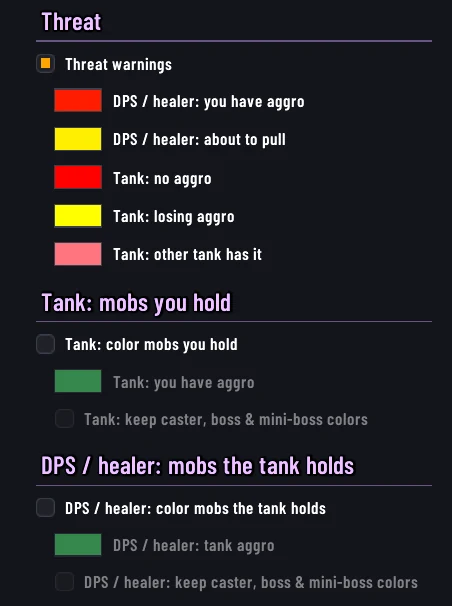
Threat colors follow your role. Flip the switch and watch the same pack tell a different story.

The MF Nameplates Designer threat settings: tank and DPS or healer color options

Or color the mobs the tank holds.

Tanks can paint every mob they hold in one color, so a loose one jumps out. DPS and healers can do the same for mobs the tank has, which makes anything off the tank easy to see.

Casters, bosses and mini-bosses can keep their own colors on top of it. Each color is yours to change in the Designer.

Never miss the cast that matters

Know the kick before you press it.

Cast bars tell you three things at a glance: what kind of cast it is, whether it is dangerous, and whether you can stop it right now. Watch the bars below, they run live.

Green border
Hexcaller Vora70%
Frost Bolt0.0
Full green bar
Hexcaller Vora70%
Frost Bolt0.0
Kick ready, your wayChoose a green border when your interrupt is available, turn the whole cast bar green, or use both.
Tidecaller Mar55%
Tidal Surge0.0
Kick + TickYour kick is on cooldown? The green tick shows the exact moment it comes back. Be there before the bar is.
Ironclad Guard88%
Crushing Blow0.0
Important castsThe dangerous ones get their own color and a marching-ants border you can't miss in a big pull.
Stone Sentinel100%
Granite Skin0.0
Can't be interruptedFaded grey, so you don't waste your kick.
Hexcaller Vora40%
Drain Essence0.0
ChannelsBlue and draining, so you can tell a channel from a cast without reading a word.
Live preview
Caster70%
Shadow Bolt3.2
Your target80%
Everyone else100%

Casts stand out

Your target gets a bright gold border and glow, and stays at full strength, so you always know what you are hitting. Everyone else fades back.

The moment an enemy starts a cast, its nameplate jumps to full opacity, so the one you need to interrupt stands out. When the cast ends, it fades back again.

18 original bar textures

Smooth, glass, runic, frost, embers and more, drawn for MF Nameplates. Each one is tinted by the bar color, so every threat and role color keeps its meaning. The MF Express font comes built in too, so you do not need a media addon to get the look.

Know what it is at a glance

Optional icons next to the bar: a skull on bosses, a shield on mini-bosses, lightning on casters and crossed swords on elites. Pick which ones you want, only in dungeons and raids if you like, and set their size and position.

Skull on a boss
Archon Veyrel100%
Shield on a mini-boss
Warden Kaldris82%
Lightning on a caster
Hexcaller Vora64%
Crossed swords on an elite
Ironclad Guard90%
Light by design

Made to disappear into your game.

Nameplates are on screen for every second of every pull, so we built MF Nameplates to do as little work as possible. No heavy scripts looping every frame, no hidden tracking, no bloat. Here is what that looks like in the code:

0
Combat log events read
It never touches the combat log
10/s
Cast countdown refresh
At most, and only while a cast bar is showing
0
Mods to import
Everything MF is built in
🎯

Listens only to what it needs

Each nameplate subscribes to the exact unit events its features use, nothing more. Switch a feature off and its work stops with it.

⏱️

Cast bars run on the game's own timer

The fill is driven by the game engine, not by our code redrawing it every frame. We only refresh the countdown text, ten times a second at most.

📏

Steady on the move

Plates are laid out on whole screen pixels, so the name, the level and the bar never wobble against each other as a plate follows its unit.

🧩

The game draws your auras

On Midnight, enemy auras are drawn by the game's own aura frames. We style them. We don't scan them, so combat stays smooth even on huge pulls.

♻️

Plates are reused, not rebuilt

Fonts and textures are set once and only touched again when you change a setting. Pulling a new pack doesn't mean rebuilding everything from scratch.

🖱️

Idle means idle

Hover checks only run while your mouse is actually over a nameplate. Hidden cast bars, off features and empty rows cost nothing.

📦

One small folder

No dependency chain, no companion addons, no scripts to keep in sync. Drop it in, type /mf, play.

Built for Midnight

Made for the rules of the game as it is now.

Midnight hides a lot of combat information from addons. MF Nameplates was designed around that from the very first line, not patched around it afterwards.

Whenever the game keeps a value secret, we hand the job back to the game: it picks the cast color, runs the cast timer, draws the aura and fills the health bar. You see the same result, and nothing depends on a workaround that the next patch can take away.

Straight talk about limits

We would rather tell you what the game doesn't allow than let you find out in a key:

  • Coloring by NPC or spell ID in combat. Those IDs are hidden from every addon now.
  • Who interrupted a cast. Hidden by the game as well.
  • Friendly plates in dungeons and raids. The game draws them, but we still let you set their font, size and hide server names.
Two looks, one addon

Looks like the game. Or like us.

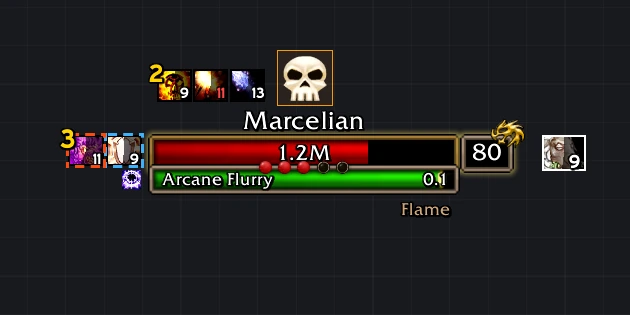
Switch between the WoW Forever Style, made to look like the game's own nameplates, and the MF Style from our videos. One button in the Designer, and everything stays editable.

WoW Forever Style

Marcelian
1.2M
80
Arcane Flurry0.0
Flame
Cave Stalker
2.4K
12

Name above the bar, a metal frame, the health number in the bar and the level in its own box, with the classic reaction colors.

MF Style

14 Hexcaller Vora70%
Frost Bolt0.0
13 Earthborer88%
12 Cave Stalker100%

The color-coded look: casters, quest mobs and bosses each get a color that means something.

Straight from the game

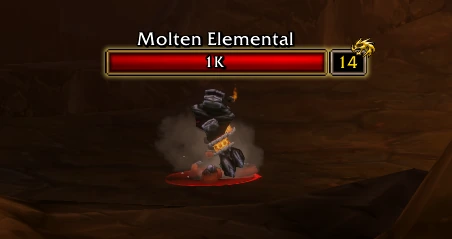
A WoW: Forever nameplate in the WoW Forever Style, with auras and a cast bar
Target, auras and a cast
A Molten Elemental nameplate in the WoW Forever Style
In the world
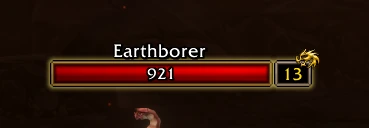
An Earthborer nameplate in the WoW Forever Style
Elite icon and level box
Interrupts

Know the kick before you press it.

Cast bars tell you what kind of cast it is and whether you can stop it right now. They run live below.

Hexcaller Vora
70%
14
Frost Bolt0.0
CastingOrange while it casts, so you can see it start.
Hexcaller Vora
70%
14
Frost Bolt0.0
Kick readyThe bar turns green the moment your interrupt is available. Prefer a green border instead, or both? It's one setting.
Stone Sentinel
1.1K
13
Granite Skin0.0
Can't be interruptedFaded grey, so you don't waste your kick.
Hexcaller Vora
40%
14
Drain Essence0.0
ChannelsGreen and draining, so you can tell a channel from a cast without reading a word.

18 original bar textures

Smooth, glass, runic, frost, embers and more, drawn for MF Nameplates. Each one is tinted by the bar color, so every threat and role color keeps its meaning. The MF Express font comes built in too, so you do not need a media addon to get the look.

Make it yours

Click it. Drag it. Done.

Type /mf and the MF Designer opens with a live nameplate you can poke at. Click any part to edit it, hold Alt and drag to move it. No digging through menus to find the thing you want to change.

The real MF Designer · click to enlarge
  • Live preview. Every change shows up on the nameplate instantly, before you ever leave the window.
  • Smart search. Type what you mean, typos included, and it jumps to the setting and highlights it.
  • Each unit type on its own. Enemy NPCs, enemy players, friendly players and friendly NPCs, each fully styled. Full plate, name only, or the game's default.
  • Preview any moment. Switch the preview to casting, channeling, kick ready, can't kick, boss or quest mob, and tune each one without waiting for it in game.
  • Copy it across. Happy with one unit type? Copy layout to the others in a click.
  • Profiles that travel. Per character or shared, copy, reset, and export or import as a single string.
  • One button back. Went too far? Reset all to MF style and you're back to the look from our videos.
  • One button back. Went too far? Reset to WoW Forever style or Reset all to MF style, whichever look you want to start from.
Everything in one install

All the MF mods, already built in.Everything you need, built in.

The mods from our videos aren't separate downloads anymore. They're part of the addon, they work together, and each one has its own switch.

🟢

MF Kick + Tick

Green border when your interrupt is ready, a tick where it comes back. Works with your class interrupt out of the box, or set your own spell ID.

🔥

MF Important Casts

Dangerous casts get their own color and a marching-ants border, so you spot them across a whole pack.

✨

MF Cast Highlight

Anything that is casting goes to full opacity. Everything else steps back.

🔮

MF Purge & Soothe

Purgeable, soothable and enrage buffs on enemies light up in their own color, so you react before they do damage. Choose glow, pulse, marching ants or border.

📈

MF M+ Percentage Midnight

Enemy forces % right under the name in Mythic+, so you can route without another addon.

⚡

MF Energy Midnight

A clean power bar under boss nameplates, so you see the big ability coming.

🛡️

WoW Forever Style

One click and the plates look like the game's own: name above the bar, metal frame, health number in the bar, the level in its own little box. Everything stays editable.

🐉

Levels, elite and faction

Mob and enemy player levels, an elite and rare icon, and the Alliance or Horde emblem on enemy players.

❗

Quest mobs, clearly

Orange nameplates and a sharp yellow exclamation mark beside the bar, so the mobs you need stand out from the pack.

🎯

Nine ways to mark your target

Glow, outline, pulse, or arrows, chevrons, brackets and an arrow above the bar. Pick the one you spot fastest, and animate it if you like.

🧰

Plays nice with your other addons

Boss mods and other addons that attach icons to nameplates find the MF plate exactly where the bar is.

🩸

Auras that make sense

Your own debuffs with a pandemic timer color, enemy buffs worth reacting to, and crowd control on its own row.

🔎

Custom Debuffs

Type a spell ID or name. Track it on every enemy, or hide it for good.

💎

Class resources on your target

Holy power, combo points, runes, chi, arcane charges, soul shards and essence, right under the nameplate you are looking at.

📐

Stacking and size, your way

Overlap spacing, clickable area, screen-edge behavior, units behind the camera, plus the MF CVars applied in one click.

➕

And more

  • Automatic stacking and a top inset, so big pulls stay readable.
  • Reset in one click to the MF Style or the WoW Forever Style.
  • Show all enemy buffs when you want the full picture.
  • Shield (absorb) texture and position options.
  • Smooth text outlines with an adjustable shadow.
  • Bar texture strength and a color for your kick on cooldown.
Patreon Early Access

You're first in line. Always.

MF Nameplates is in early access, and Patreon members get it first. Every new build lands with you before anyone else, and the feedback you send us goes straight into the next one.

What you get

  • Every update first. New builds go to Patrons before anywhere else.
  • A direct line to us. Found a bug or want a feature? Tell us in #vip-support, the dedicated channel for Patrons on our Discord.
  • Your name in the addon. Master Patrons get a silver badge 🥈 and Veteran Patrons a gold badge 🥇 on the Kings & Queens wall, right inside MF Nameplates.
  • Both clients. Midnight and WoW: Forever, in the same download.

Install in a minute

  1. Download the latest build from our Patreon post.
  2. Copy the MFNameplates folder into your Interface\AddOns folder and start the game.
  3. Type /mf in chat to make it yours.
Join on Patreon Already a Patron? The download is in your Patreon feed.
Questions

Before you ask.

Do I need Plater, Platynator or any other addon?

No. MF Nameplates is a complete nameplate addon on its own. Run only one nameplate addon at a time, and if another one is active, MF Nameplates warns you on start.

Will an update wipe my settings?

No. Your profiles are saved by the game and carry over between versions. If you ever want a fresh start, Reset all to MF style is one click away.

Can I back up or share my settings?

Yes. In the Profiles tab you can export your profile as a single string, then import it on another character, another PC, or send it to a friend. Profiles can be per character or shared across all of them.

Can I customize it the way I want to?

Yes. You can change anything you like, and the search box finds any setting instantly, so you never have to dig through menus to find what you want to change.

Which game versions does it support?

Retail 12.1.x and WoW: Forever 1.60.x.

Something looks wrong. Where do I report it?

Post in #vip-support on our Discord. If you get an error, a screenshot from BugSack helps us fix it much faster.